How to De-register Your WhatsApp Number from a Tech Provider or BSP
Another provider's signup can refuse your number with "already registered" while the old provider still holds it. You don't need to be stuck: you can free it yourself. How depends on one thing, whether the number is also on the WhatsApp Business app.
Which one do you have?
- Standard onboarding by a provider (API only): the number works only through the provider and isn't on the WhatsApp Business app. You don't have the access token. Go to Way 1 or Way 3.
- Standard onboarding, done by yourself (API only): you registered the number with your own app, so you hold the access token. Go to Way 2.
- Coexistence: you still use the number in the WhatsApp Business app, and the provider is connected alongside it. You disconnect it in the app rather than de-register it. Go to coexistence numbers.
Not sure? If you can open the number's chats in the WhatsApp Business app, it's coexistence. The move guide shows how to check in Business Settings.
Standard-onboarding (API-only) numbers
There are three ways. Which one fits depends on who holds the number's access token.
Way 1. A provider onboarded it: ask them to deregister it
- Write to the provider's support and ask them to deregister the phone number (their API has a deregister call for it). Say which number and which account.
- Ask them to confirm when it's done.
- Wait a few minutes, then run the new provider's signup again.
This works whenever the provider is responsive. It doesn't need your PIN, and it's not blocked by recent paid messages.
Way 2. You onboarded it yourself: call the deregister API
If you registered the number with your own app, you hold the access token, so you can deregister it directly. You need the number's phone number ID (not the phone number) and a token for it.
curl -X POST 'https://graph.facebook.com/v26.0/<PHONE_NUMBER_ID>/deregister' \
  -H 'Authorization: Bearer <ACCESS_TOKEN>'
Then wait a few minutes and run the new provider's signup. You can also
check the number's status
afterwards, which should no longer be CONNECTED.
- No PIN and no request body. The call takes no parameters. The PIN is only needed to register a number.
- The token needs the
whatsapp_business_managementpermission. - It makes the number unusable with the Cloud API. It does not delete the number or its message history.
- It can't be used on a number that is also on the WhatsApp Business app.
- Meta allows 10 requests per number in 72 hours. Past that, error 133016 blocks it for 72 hours.
Source: Meta for Developers, WhatsApp Business Phone Number Deregister.
Way 3. Delete the number yourself in WhatsApp Manager
- Open WhatsApp Manager and load your business portfolio. If it opens the wrong account or shows an error, go through Business Settings → Accounts → WhatsApp accounts → your account instead.
- Go to Account tools (the toolbox icon) → Phone numbers.
- Click the trash can icon next to the number.
- If it asks for the two-step verification PIN, enter it (see the two-step PIN below), and complete the flow.
- Wait a few minutes, then run the new provider's signup again.
What has to be true
- You must be an admin of the business portfolio that owns the account.
- The number must not have sent paid messages in the last 30 days. If it has, WhatsApp Manager shows the date of the last paid message instead, and you can delete the number 30 days after it.
- Deleting can only be done in WhatsApp Manager. Meta doesn't allow it through the API.
Deleting removes the number from that WhatsApp account altogether, which is a stronger step than deregistering it. If you only want to hand the number to another provider, Way 1 or Way 2 is the lighter choice.
Way 3 asks for a PIN: if you've lost it
- Only Way 3 needs the PIN (and registering a number). Ways 1 and 2 don't.
- Meta is removing the PIN for eligible numbers. Its account-model page says it is deprecating the six-digit PIN for eligible Cloud API numbers, with eligibility rolling out gradually from September 23, 2026. For those numbers WhatsApp Manager no longer shows the Two-step verification tab, and there is no PIN to create, reset or disable. Registration no longer validates the PIN, though providers still send a six-digit
pinfor now. - If the tab is still there, the number still has a PIN. Meta asks for it to change the PIN or to delete the number, and the next provider needs it to register. Ask the old provider first: many set it and can tell you.
- If nobody has it, you can turn it off yourself, only in WhatsApp Manager:
- Go to Account tools → Phone numbers and select the number.
- Open the Two-step verification tab and click Change PIN.
- On the last step click Turn off two-step verification.
- Meta emails a link to the address on your business portfolio. Use it to confirm. Once it's off, you can set a new PIN whenever you like.
- A provider can set a new PIN through the API. Nobody can turn two-step verification off through the API.
Source: Meta for Developers, Updates to WhatsApp Business accounts (2FA PIN).
Coexistence numbers: you disconnect, you don't de-register
Technically this is a disconnect, not a de-registration. A coexistence number stays registered on your WhatsApp Business app, and you only detach the provider's API connection from it. Meta's deregister call can't be used on a number that is on both the app and the API.
- On your phone, open the WhatsApp Business app.
- Go to Settings → Account → Business Platform.
- Select the connected provider and tap Disconnect.
- Wait 15 minutes, then run the new provider's signup.
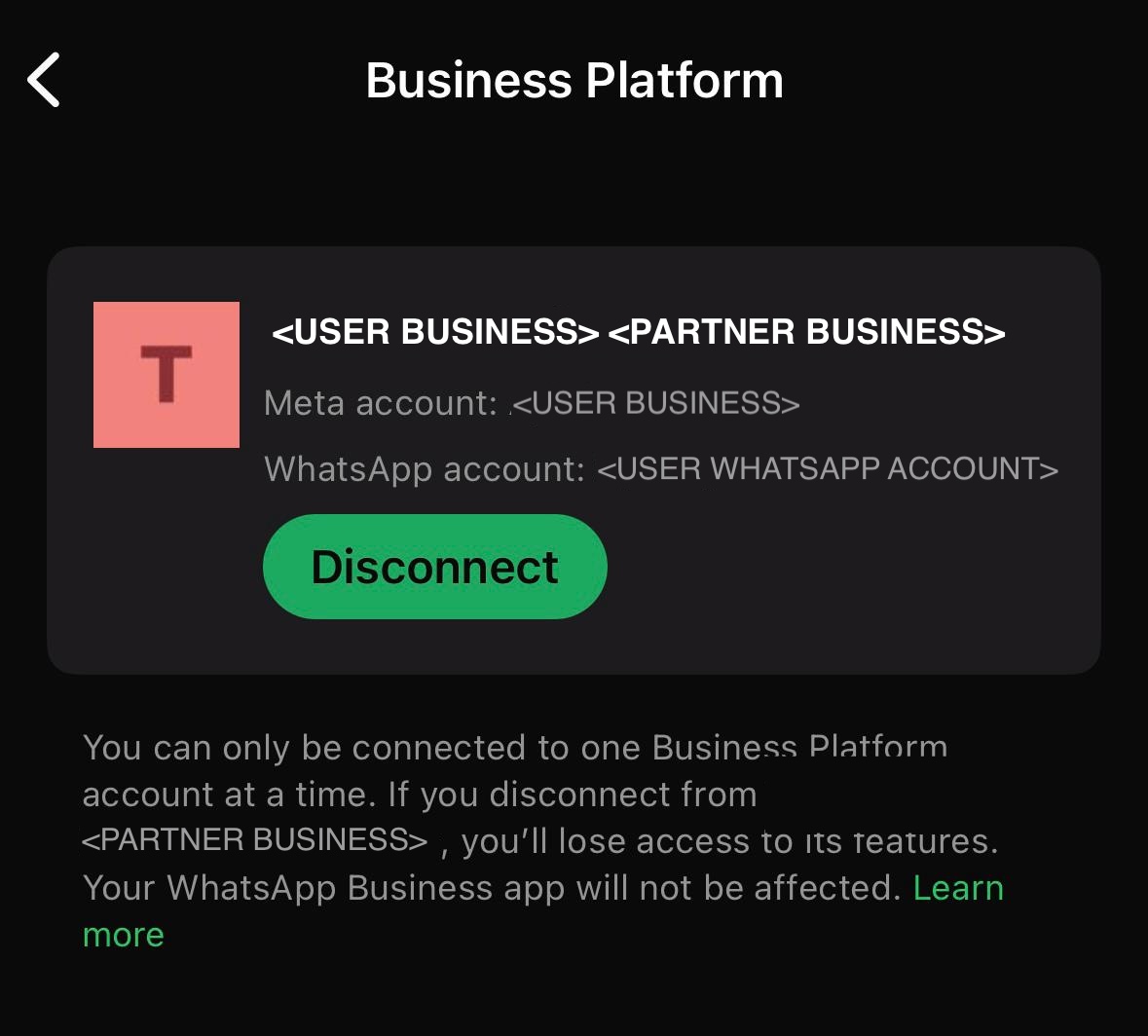
The provider is told the connection was removed, and its sends stop working from that moment. If you then want to leave the number API-free altogether, you're done. If you're moving to another provider, the move guide covers the rest.
What does not deregister a number
- Removing the provider in Business Settings (unsharing the account or removing the partner) only takes away their access. The number may still be registered, and the next provider's signup can still say "already registered".
- Cancelling the provider's subscription doesn't deregister it either. Ask them to deregister first, then cancel.
- Deleting the provider's app or token on your side doesn't touch Meta's registration.
After it's free
- Wait a few minutes before retrying. Meta's error messages say it can take up to 3 minutes, and 15 minutes after a Business app disconnect.
- PIN: if your new provider does standard onboarding, it will need your PIN when it registers the number, if the number still has one (see the two-step PIN). No PIN is needed for coexistence onboarding.
- If the signup still says "already registered", the number may be on another WhatsApp product, or in someone else's account. Check the number was typed correctly.
- Your templates are on the Messaging account, not the number. See the move guide for what to check.
If something goes wrong
- Deregister API, error 133016 ("too many attempts"): Meta allows 10 deregistration requests per number in 72 hours. Past that, the number can't be deregistered for the next 72 hours. Stop retrying and wait.
- Deregister API, error 100 ("invalid parameter"): check you used the phone number ID, not the phone number, and that the number belongs to the account your token can reach.
- Deregister API, error 131000 ("something went wrong"): retry after a minute. If it keeps failing, ask Meta support, or ask the provider.
- Deregister API returns an authorization or permission error: the token is missing
whatsapp_business_management, has expired, or isn't for this account. Generate a token with that permission and try again. - Deregister API refuses the number because it is also on the WhatsApp Business app: that is a coexistence number. Disconnect it in the app instead (see coexistence numbers).
- WhatsApp Manager shows a date instead of letting you delete the number: the number sent paid messages in the last 30 days. Wait until 30 days after that date, or ask the provider to deregister it (Way 1).
- WhatsApp Manager says you don't have access to the account, or "this content isn't available": you may have access to the WhatsApp account but not to the Messaging account it opens on, or the link opened a stale account. Go through Business Settings → Accounts → WhatsApp accounts, and check you're an admin of the portfolio that owns it.
- The new provider's signup says "The phone number you entered is already registered" (3441030): the number is still registered. Check it was deregistered, with the status call in the registration guide, and that the signup is using the right number.
- "This number is registered to an existing WhatsApp account": Meta says it can take up to 3 minutes for the number to become available after you disconnect or deregister. Wait, then try again.
- "This phone number is already registered with the product" (3441049) or "Please disconnect your business platform to continue" (2655094): the number is still connected through the WhatsApp Business app. Disconnect it there and wait 15 minutes.
- "Switching partners is not supported in this flow" (2655093): the same thing for a coexistence number: disconnect the current partner in the WhatsApp Business app, then connect the new one.
Meta's own docs
- Business phone numbers: two-step verification and deleting numbers
- Onboard WhatsApp Business app users (Coexistence)
- Embedded Signup errors
Moving to another provider?
How to move your number to another provider →